DEP – Cohort 2
Join Discord
Why Join the Discord?
The DAO Experimentation Program uses Discord as its main community hub — where you’ll:
- Connect with your DAO team
- Ask questions and get support
- Collaborate on proposals and execution
- Receive announcements and updates
Every participant is required to join and stay active in the server during the program.
Step 1: Join the Server
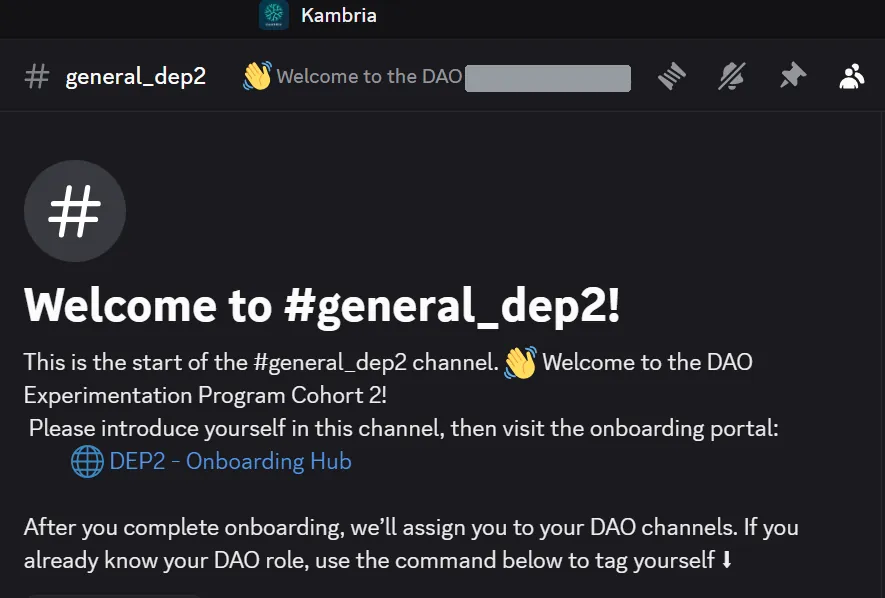
Click here to join the official Kambria Discord server: 👉 Join Kambria Discord You’ll land in the #general-dep2 channel.
Step 2: Choose the icon that reflects Your DAO
After joining, scroll to the pinned message in #general-dep2. You’ll see instructions like this:
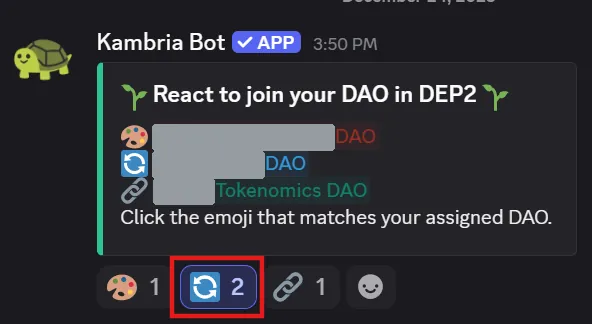
Please choose the emoji according to your assigned DAO. The bot will automatically assign you access to your DAO’s private channel and add a role to your account.
You can double check whether you are assigned to the DAO or not through looking at the listed roles in your profile.
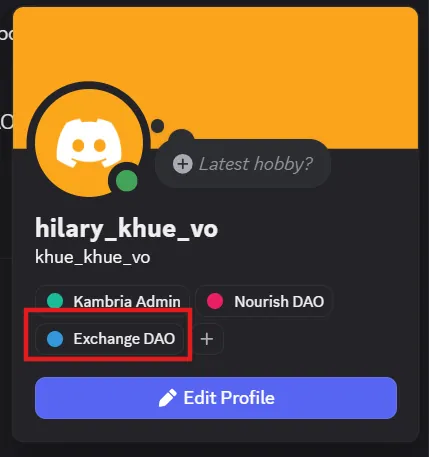
If you’re not sure which DAO you're assigned to, check your onboarding email or ask in #onboarding-help.
Step 3: Say Hello
Once your role is set, you’ll gain access to:
- Your DAO’s main channel (e.g. #exchange-dao)
- Program-wide channels like #onboarding-help and #showcase-highlights
We encourage you to:
- Introduce yourself in your DAO channel
- Ask questions freely - facilitators are here to help
- Check pinned messages for quick links and checklists
Discord Channel Overview
| Channel Name | Purpose |
|---|---|
| #general-dep2 | Announcements, open Q&A, program updates |
| #onboarding-help | Ask setup questions, get troubleshooting |
| #showcase-highlights | See inspiring updates from all DAOs |
| #exchange_dao, #cultural_creative_dao, #kat_tokenomic_dao | DAO-specific collaboration space |
Having Trouble?
If you’re unable to join or can’t see your DAO channels:
- Double-check that you clicked the correct emoji
- Ask in #onboarding-help
- Or email: dep@kambria.io